
This is an old revision of the document!
Windows Update error 80072ee2
<img width“802” alt“Windows_Update_failure_-_80072EE2_c.png” src“http://www.netsec.pro/twiki/pub/Main/WindowsUpdateError80072ee2/Windows_Update_failure_-_80072EE2_c.png” title“Windows_Update_failure_-_80072EE2_c.png” height''“600” />
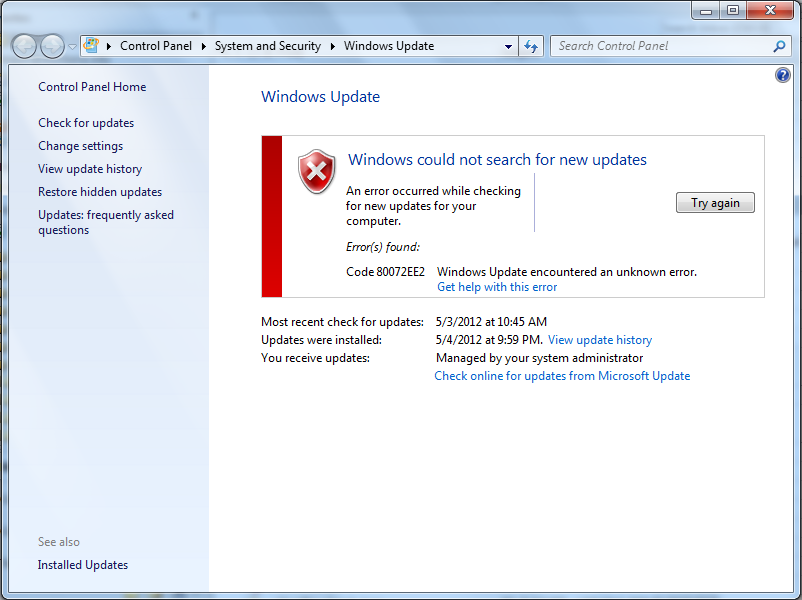
You can try what Microsoft recommends first:<br /> http://windows.microsoft.com/en-us/windows-vista/Windows-Update-error-80072ee2
When that fails (i meant 'if') try the following:
- . Download this REG file - http://www.netsec.pro/twiki/pub/Main/WindowsUpdateError80072ee2/AutomaticUpdate-RemoveUseServer.reg
- . Double-click on it to import the setting.
- . Restart theWindows Update service.
- . Try running Windows Updates again.
Or you can manually do it via regedit:
- . Run !RegEdit and browse to the following key: <br />
HKEY_LOCAL_MACHINE\SOFTWARE\Policies\Microsoft\Windows\WindowsUpdate\AU - . On the right, delete this value: <br />
“UseWUServer”=dword:00000001<br />Just right-click on it and selectDelete - . Close the registry editor and restart theWindows Update service.
- . Run Windows Updates.
– Main.FredPettis - 2012-06-06
 automaticupdate-removeuseserver.reg_attachment_automaticupdate-removeuseserver.reg